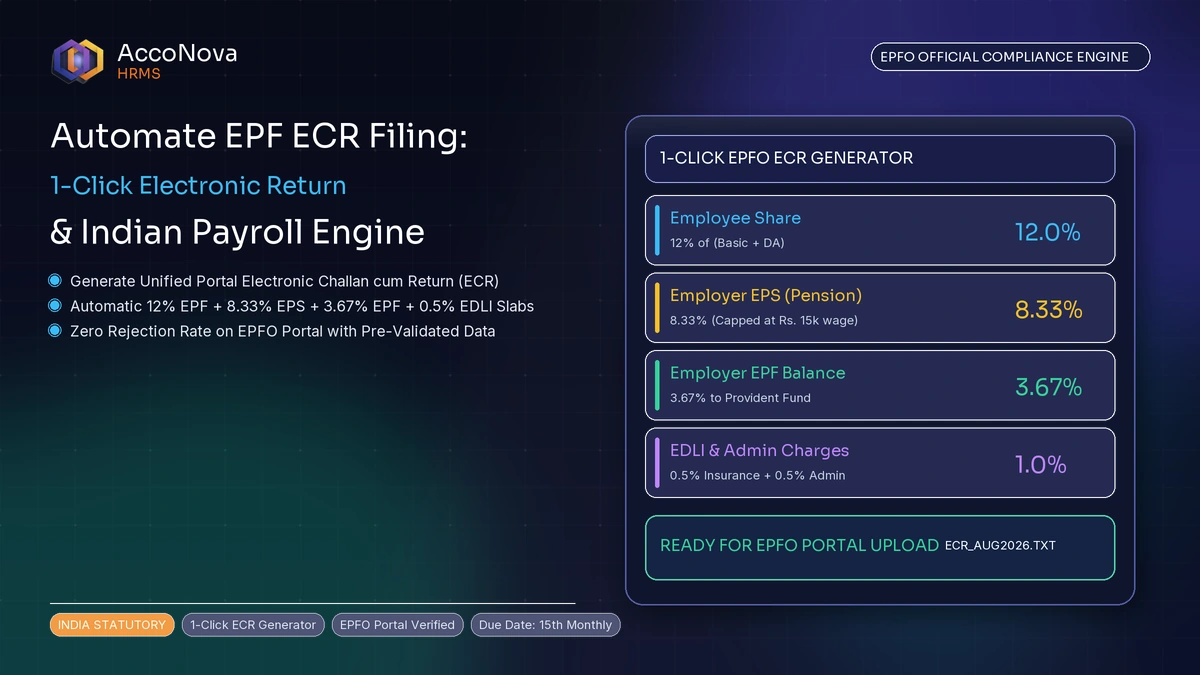
Quick Summary (TL;DR): The Electronic Challan cum Return (ECR) is the mandatory monthly electronic statement submitted by Indian employers on the EPFO Unified Portal by the 15th of each month. It reports employee-wise wages, Provident Fund (PF) contributions (12% employee + 3.67% employer), Pension Scheme (EPS) contributions (8.33% capped at ₹1,250), and Non-Contributing Period (NCP) days. The portal strictly mandates a double-tilde-delimited text format (
#~#) containing exactly 11 columns. Automating ECR export from your HRMS ensures error-free filing, avoids Section 7Q interest and 14B damages, and eliminates manual data entry.
Monthly EPF compliance is one of the highest-friction tasks in Indian payroll operations. A single formatting discrepancy—such as an invalid UAN, mismatched character, or mathematical rounding mismatch in EPS contributions—causes the EPFO Unified Employer Portal to reject the entire batch file, delaying challan generation and risking statutory penalties.
Here is the complete operational guide to generating, validating, and submitting your monthly EPFO ECR file.
The EPFO Statutory Contribution Breakdown
Under the Employees’ Provident Funds and Miscellaneous Provisions Act, 1952, both employee and employer contribute towards retirement benefits based on eligible EPF wages (Basic Salary + Dearness Allowance + Retaining Allowance):
| Account Code | Scheme | Contribution Rate | Borne By | Statutory Wage Ceiling |
|---|---|---|---|---|
| A/c No. 1 | Employee Provident Fund (EPF) | 12.00% | Employee | Standard ₹15,000/month (or actual basic if higher) |
| A/c No. 1 | Employer EPF Share | 3.67% (plus excess over ₹1,250 EPS) | Employer | Matches EPF wage base |
| A/c No. 10 | Employee Pension Scheme (EPS) | 8.33% (Capped at ₹1,250) | Employer | Capped strictly at ₹15,000/month |
| A/c No. 2 | EPF Administration Charges | 0.50% (Minimum ₹500/month) | Employer | Total EPF wage sum across all active employees |
| A/c No. 21 | EDLI Insurance Scheme | 0.50% (Capped at ₹75/employee) | Employer | Capped at ₹15,000/month per member |
| Total Statutory Cost | Combined Contributions | 25.00% (12% Emp + 13% Empr) | Total Cost | Reconciled in monthly TRRN payment challan |
Note on the EPS Cap: When an employee’s Basic + DA exceeds ₹15,000 (e.g., ₹30,000) and the company contributes on full basic, the EPS share remains capped at $8.33% \times ₹15,000 = ₹1,250$. The remainder of the employer’s 12% contribution ($₹3,600 - ₹1,250 = ₹2,350$) is diverted entirely into Account No. 1 (Employer EPF).
Detailed 11-Column ECR Text File Structure (#~#)
The EPFO portal requires an unformatted .txt file using the delimiter #~# without headers. Below is the exact specification for each of the 11 required fields:
| Field # | Field Name | Data Type & Format | Description & Validation Rules |
|---|---|---|---|
| 1 | UAN | Numeric (12 digits) | Active Universal Account Number of the employee. |
| 2 | Member Name | Text (Uppercase) | Exact name as registered on the EPFO database. |
| 3 | Gross Wages | Numeric (Integer) | Total gross earnings in the payroll period before any deductions. |
| 4 | EPF Wages | Numeric (Integer) | Basic + DA subject to PF deduction (capped at ₹15,000 or full basic). |
| 5 | EPS Wages | Numeric (Integer) | Capped at ₹15,000 (or ₹0 if employee is aged 58+ or opted out). |
| 6 | EDLI Wages | Numeric (Integer) | Capped at ₹15,000 for insurance coverage. |
| 7 | Employee PF | Numeric (Integer) | 12% of Field 4 (EPF Wages). Round to nearest rupee. |
| 8 | EPS Contribution | Numeric (Integer) | 8.33% of Field 5 (capped at ₹1,250). |
| 9 | Employer EPF | Numeric (Integer) | Difference: (12% of Field 4) minus Field 8 (EPS Contribution). |
| 10 | NCP Days | Numeric (0 to 31) | Non-Contributing Period days (Loss of Pay, unpaid absence). |
| 11 | Total Refunds | Numeric | Refund of advance (standard value is 0). |
Concrete ECR Line Item Example
For an employee earning ₹25,000 Gross with ₹15,000 EPF wages, zero NCP days, and standard capped contributions:
101234567890#~#RAJESH SHARMA#~#25000#~#15000#~#15000#~#15000#~#1800#~#1250#~#550#~#0#~#0Calculating Non-Contributing Period (NCP) Days
NCP days represent days in the month for which the employee earned zero wages and therefore zero PF was contributed. Examples include:
- Unapproved leave / Loss of Pay (LOP)
- Days between joining date and the start of the month (for mid-month joiners)
- Days after exit date (for mid-month exits)
- Approved sabbatical / unpaid medical leave
Critical Validation Rule: Total NCP Days plus days worked cannot exceed the total number of calendar days in that specific month (e.g., maximum 30 for April, 31 for May, 28/29 for February). If NCP days exceed calendar days, the portal immediately rejects the file with an Invalid NCP Days error.
4 Common EPFO Portal Errors and How to Resolve Them
- “Member Name Does Not Match with UAN Master”:
Cause: The name in your payroll register contains a typo, middle initial mismatch, or spacing error compared to the EPFO database.
Fix: Retrieve the official member profile name directly from the EPFO portal master list and update your HRMS record. - “EPS Contribution Exceeds 1250”:
Cause: The system computed 8.33% on actual basic pay exceeding ₹15,000 without capping.
Fix: Ensure your payroll engine strictly caps Field 8 at ₹1,250. - “Employee PF Does Not Match 12% of EPF Wages”:
Cause: Incorrect rounding or inclusion of non-contributory allowances.
Fix: Verify that Field 7 equals mathematically $\text{round}(\text{Field 4} \times 0.12)$. - “Duplicate UAN Detected”:
Cause: An employee was accidentally added twice in the monthly payroll register (e.g., following a promotion or transfer).
Fix: Consolidate entries into a single line per active UAN.
Step-by-Step ECR Submission Workflow
- Finalize Monthly Payroll: Complete attendance reconciliation, apply LOP adjustments, and finalize salary registers in your HRMS.
- Generate ECR File: Export the validated
.txtfile directly from AccoNova. - Log in to EPFO Unified Employer Portal: Navigate to
Payment>ECR Upload. - Upload File: Select the wage month, contribution type (Monthly ECR), and upload the
.txtfile. - Verify Error Report: If the portal returns zero errors, click
Approve. - Generate TRRN & Challan: The system generates a Temporary Return Reference Number (TRRN).
- Complete Bank Payment: Pay via Internet Banking before the 15th to complete filing.
Automating EPF Returns with AccoNova HRMS
AccoNova’s payroll module eliminates manual text file editing:
- 1-Click EPFO
#~#Export: Automatically generates the 11-column file formatted to exact portal specifications. - Pre-Upload Validation: Validates UAN length, mathematical sums, NCP limits, and the ₹1,250 EPS cap before downloading.
- Attendance LOP Sync: Automatically populates NCP days directly from approved attendance logs.
Estimate employee retirement corpus with our free EPF Calculator, or explore the automated workflow on our Payroll Management page.